Credit Partnerize publishers with item-level promotions
Overview
Use an item-level promotion to collect the information that allows Cleverbridge to correctly credit Partnerize publishers who distribute promotional coupon codes through mailings, print media, web forums, and other channels.
An active integration with a Partnerize campaign is required.
Add Partnerize publisher information
Create or edit an item-level promotion in SCM. For complete setup instructions, see Implement item-level promotions.
In the promotion's General settings, enter the Partnerize publisher information in X-Parameters using the following format:
x-publisher-id=<partnerize publisher ID>
The <partnerize publisher ID> value can remain empty. To connect multiple X-parameters, use &.
x-publisher-id=130l392
The X-Parameters setting overrides any X-parameters passed to the order process or previously stored in a cookie. For general information about X-parameters, see Set up x-parameters.
Find a Partnerize Publisher ID
To find a publisher's Partnerize Publisher ID:
-
In Partnerize, click Partners in the main menu.

-
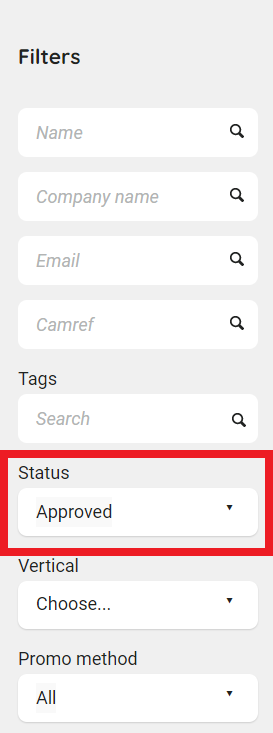
In the left column, select Status > Approved as a filter.
-
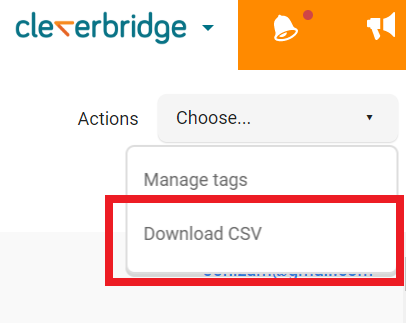
From the Actions drop-down list, select Download CSV. Partnerize downloads a CSV file.
-
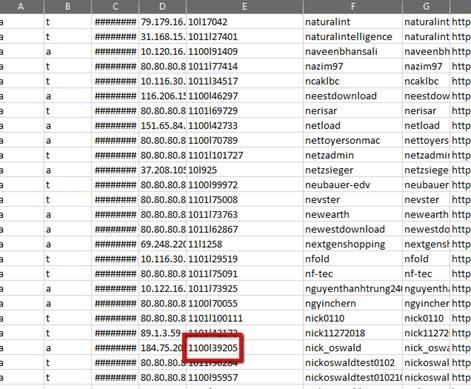
Open the CSV file and find the publishers you want to credit. Their Partnerize Publisher IDs appear in Column E.