Offer card payments
Overview
Cards provide broad coverage for one-time purchases and subscriptions. The card brands shown at checkout depend on the customer country, transaction currency, checkout configuration, and your Cleverbridge account setup.
This page explains card payments from the client's perspective. You can share the Pay by card guide with customers who need help completing a payment or updating the payment method for a renewal.
To review or change the card options in your checkout, contact Client Experience.
Cards at a glance
Why offer card payments
Card payments are one of the most widely used ways to pay online. Cleverbridge supports multiple card schemes, helping you offer a familiar payment experience across markets while supporting both one-time purchases and recurring subscription payments. Cards can help you:
- Offer a familiar online payment method across a broad range of markets.
- Support one-time purchases, initial subscription payments, and automatic renewals.
- Use issuer authentication, including SCA when required.
- Recover eligible failed payments through configured retries and payment-update flows.
How card payments work
- One-time payments
- Recurring payments
One-time payments
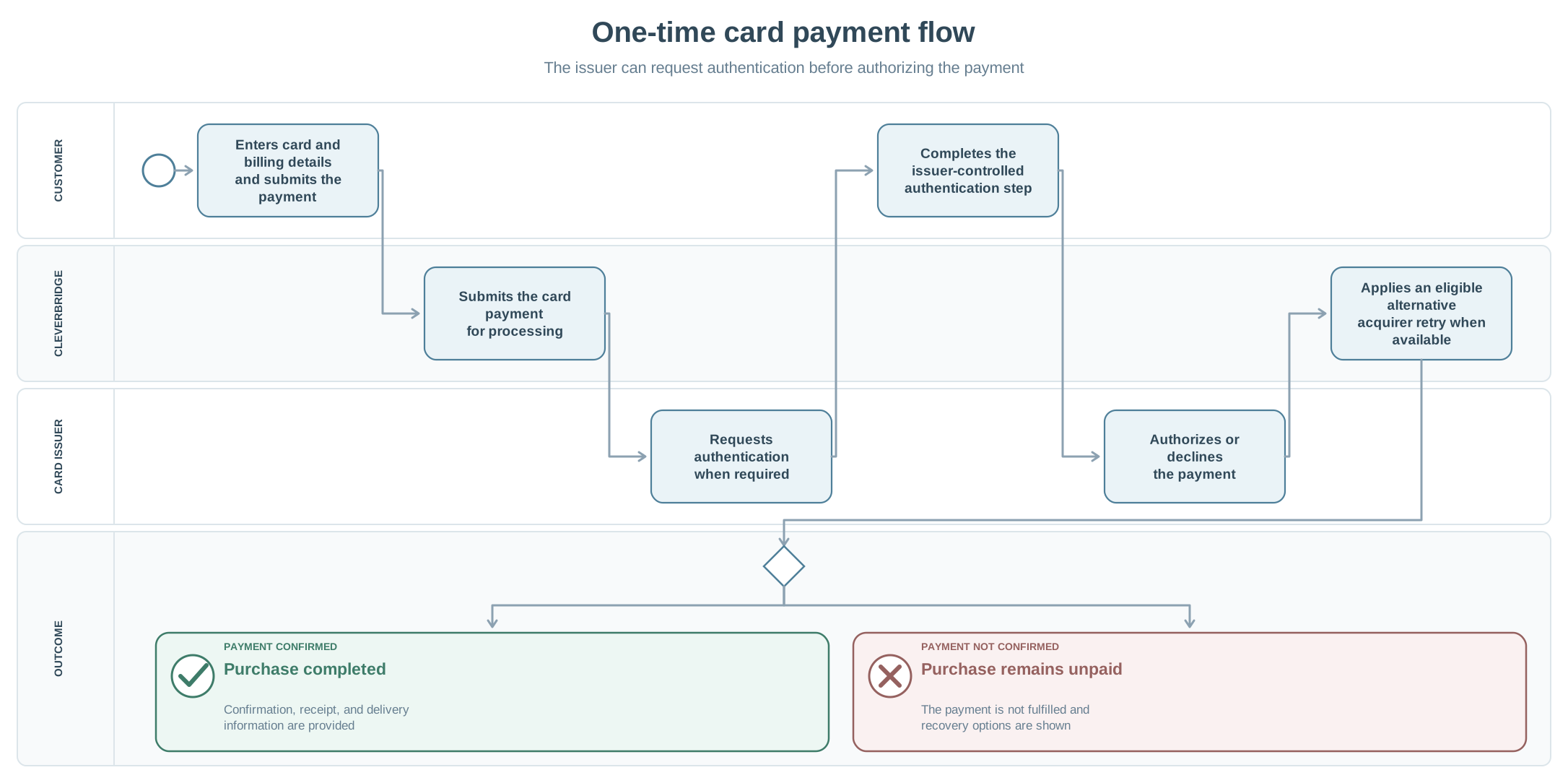
View flow details for one-time card purchases
-
The customer enters their card and billing details on the Cleverbridge checkout page, reviews the order, and submits the payment.
-
Cleverbridge submits the payment for processing. The card issuer evaluates the card details and determines whether additional cardholder authentication is required.
-
If authentication is required, the customer completes the issuer-controlled authentication step.
- For example, the customer might approve the transaction in a banking app or enter a one-time code.
- Not every card payment requires additional authentication.
- If the customer does not complete authentication, the payment cannot be approved.
-
The card issuer authorizes or declines the payment.
- For eligible processing failures, dynamic transaction routing may immediately re-attempt the payment through an alternative acquirer network before the payment is treated as declined.
-
If the payment is approved:
- Cleverbridge completes the purchase.
- The customer sees the confirmation page with the applicable product and delivery information.
- Cleverbridge sends the customer an Invoice (receipt) email with the applicable delivery information.
- If configured, Cleverbridge sends your system a
PaidOrderNotification.
-
If the payment is declined or authentication is not completed:
- The purchase remains unpaid and is not fulfilled.
- Cleverbridge sends the customer the applicable Payment declined communication.
- Where supported, the customer can correct or update the payment details and try again.
Recurring payments
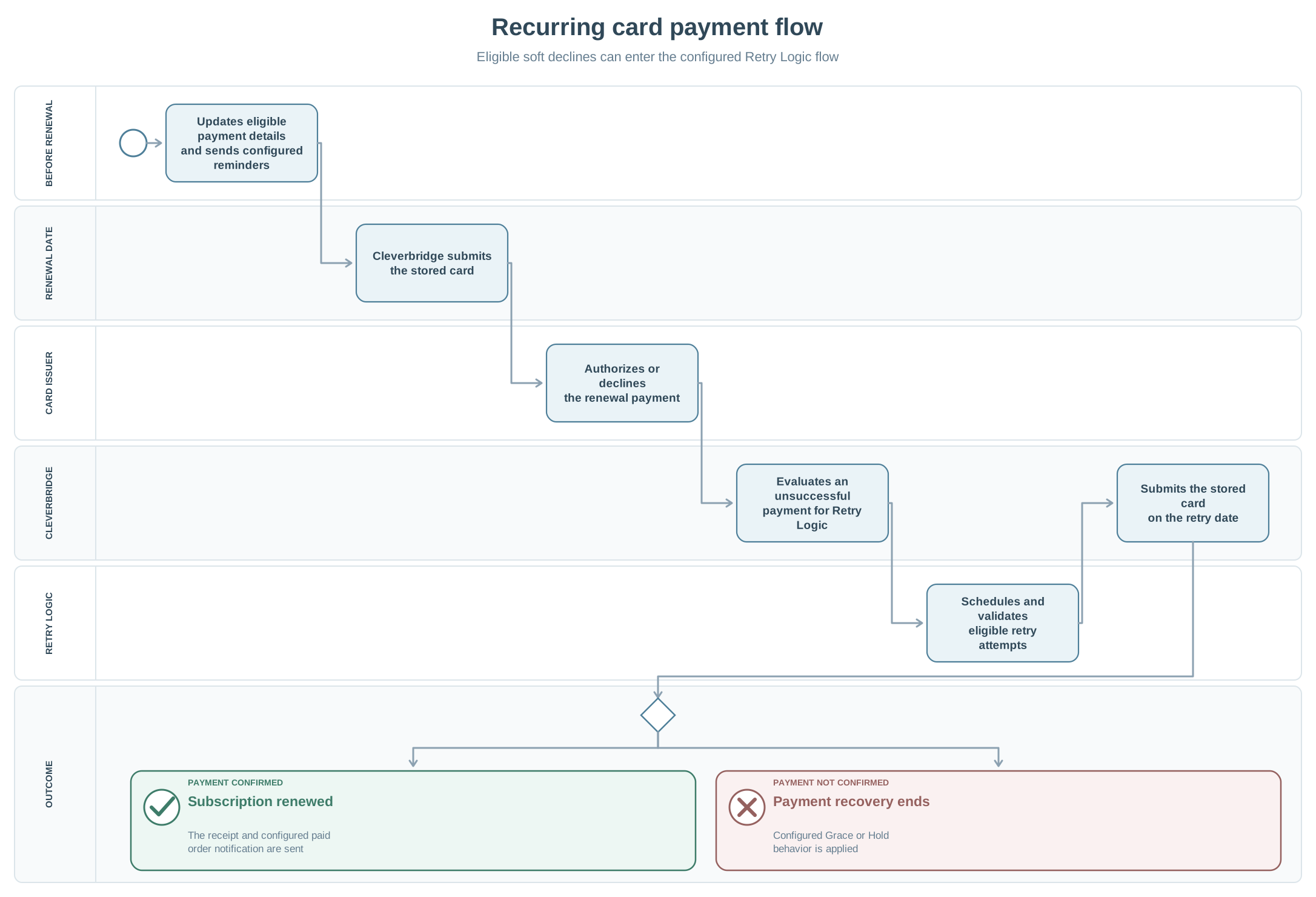
For an automatically renewing subscription, Cleverbridge submits the stored card for payment on the renewal date.
No renewal payment is attempted if automatic renewal was turned off or the subscription was deactivated before the renewal date.
View flow details for recurring card payments
-
Before the renewal date:
- Account Updater can update eligible stored card details if the service is enabled.
- Cleverbridge can send configured renewal reminder emails.
-
On the renewal date, Cleverbridge submits the stored card for payment.
-
The card issuer authorizes or declines the payment.
-
If the payment succeeds:
- Cleverbridge renews the subscription.
- Cleverbridge sends the customer an Invoice (receipt) email.
- If configured, Cleverbridge sends your system a
PaidOrderNotification.
-
If the initial payment attempt fails:
- For eligible processing failures, dynamic transaction routing may immediately re-attempt the payment through an alternative acquirer network.
- If the payment is still unsuccessful, Cleverbridge evaluates whether it is eligible for Retry Logic.
-
Cleverbridge classifies the unsuccessful payment attempt:
- A hard decline, such as an expired or invalid card, is not retried automatically through Retry Logic.
- A soft decline caused by a potentially temporary issue can be retried.
- For details, see How Retry Logic is executed.
-
For an eligible soft decline, Cleverbridge schedules the next payment attempt:
- By default, Cleverbridge makes one retry five days after the initial failed payment.
- A customized static schedule can include up to four retries within 14 days after the initial failed payment.
- If Dynamic Retries are enabled, Cleverbridge determines the retry timing automatically.
- For details, see Retry Logic options.
-
After scheduling a retry, Cleverbridge sends the applicable configured customer communication.
-
Before a scheduled retry, Cleverbridge checks whether the retry is still required and valid:
- No retry is made if the subscription was canceled.
- No retry is made if the customer has already completed the payment.
- The old card details are not retried if the customer changed the payment method.
- No retry is made if the original transaction is no longer eligible.
-
On the scheduled retry date, Cleverbridge submits the stored card again.
-
If the retry succeeds:
- Cleverbridge renews the subscription.
- Cleverbridge sends the customer an Invoice (receipt) email.
- If configured, Cleverbridge sends your system a
PaidOrderNotification.
-
If the retry fails:
- If another retry is scheduled, Cleverbridge waits until the next scheduled attempt and repeats the applicable checks.
- If no additional retry is scheduled, payment recovery ends.
-
When payment recovery ends:
- The subscription follows the configured Grace or Hold behavior.
- If the subscription is placed on Hold, Cleverbridge sends the applicable On hold notification.
For a complete description of the retry types, configuration options, customer notifications, and pre-retry checks, see Recover failed online payments.
Strong Customer Authentication (SCA)
The issuing bank can ask the cardholder to complete additional verification before authorizing a payment. The customer might approve the transaction in a banking app, enter a one-time code, or complete another issuer-controlled step.
SCA is not specific to cards: it can apply to other electronic payment methods as well. For the regulatory scope and exemptions, see Strong Customer Authentication (SCA).
Failed payments and recovery
A card payment can fail during the initial checkout or at subscription renewal. Depending on your configuration, Cleverbridge can retry eligible online payments and send the customer a link to update the payment method and complete the outstanding payment.
For recovery configuration and behavior, see Collect failed online payments automatically.
Handling refunds
Eligible credit and debit card purchases can be refunded through the standard Cleverbridge refund process. If your account is eligible for client-managed refunds, you can issue supported refunds in SCM.
After Cleverbridge processes the refund, the time required for the credit to appear in the customer's account depends on the card issuer.
For supported options and instructions, see Handle refunds.