Configure links with URL parameters
Use URL parameters to manually create or update destination URLs that send customers to Cleverbridge-hosted pages, including checkout. Parameters let you control page behavior, prefill values, and localize the experience. You can append parameters to a link you build with the Link Generator, or construct the full URL by hand for quick changes or programmatic generation.
URL structure
The URL starts with the basic parameters followed by additional parameters (if any) and has the following structure:
https://www.cleverbridge.com/<client account id>/?scope=<name>&cart=<product list>&<additional parameter>
Basic parameters
client account id: Your Cleverbridge ID number.scope: Valid scope names arecart,checkout, andquote. Additional scopes for partners arecheckoutresandquoteres. For more information, see Further Parameter Values for the Scope Parameter.cart: Cleverbridge product ID or internal product ID of the selected products. Separate multiple product IDs with a comma.noteIf the internal product ID is used, it should be preceded by the capital letter I.
Example:&cart=97769,IBC345
Additional parameters
Additional parameters follow the basic parameters and are prefixed with &.
For example, you can use additional parameters to modify the link as follows:
- Save cart items with a cookie (
cookie=true). - Show a Continue Shopping link (
continueurl=<URL-encoded link>). - Define a Continue Shopping hash (
continuehash=<hash>). - Specify available order currencies (
currency=<ISO 4217 code>), for example,¤cies=EUR,USD,CHF. - Define the coupon code (
coupon=<code>).tipYou can use the
enablecouponparameter and set it tofalseto disable any coupon codes in the URL. - Add product recommendations (
recommendation=<list>oraddrecommendation=<value>). For example,...&recommendation=XS01,upab,cd,.tipYou can use
recommendation=noneto disable all recommendations defined in the URL. - Trigger a campaign tracking pixel (
&tracking=<tracking ID>).

The URL opens the checkout page (scope=checkout), preloads the cart with the product whose Cleverbridge product ID is 97771 (cart=97771), and sets the quantity to 2 (quantity=2). It also enables a cookie so that the cart persists if the shopper returns later (cookie=true) and limits the currency selector to the listed ISO 4217 codes (currencies=EUR,USD,CHF).
This article provides some of the most common examples. For complete lists of supported URL parameters, see the Developer Hub:
- Checkout Process Parameters
- Further Parameter Values for the Scope Parameter
- URL Parameters for Cookie URLs
Cleverbridge's URLs must not exceed 2,000 characters. Certain browsers may not be able to process URLs that exceed this length.
B2B checkout funnel
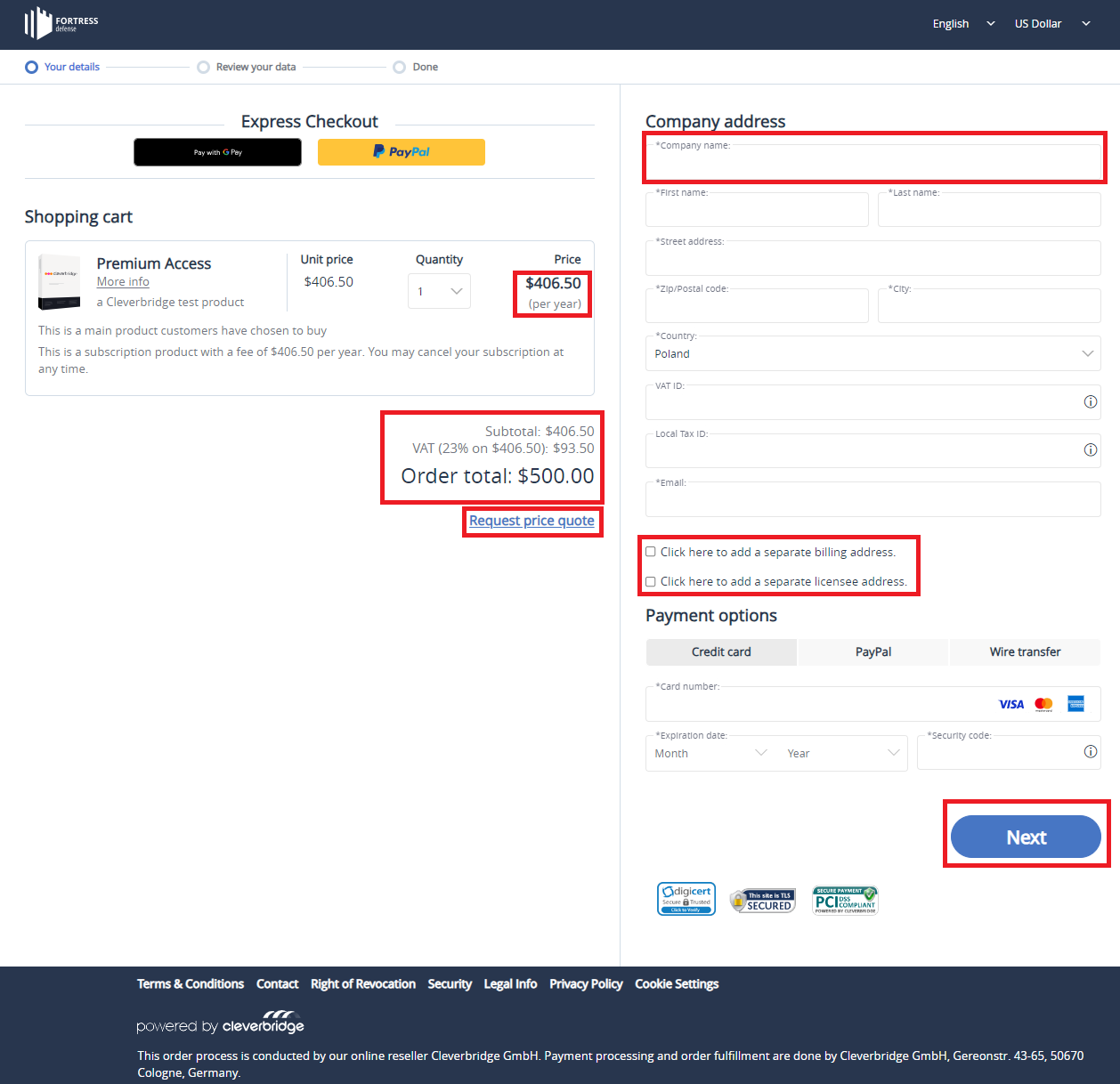
You can use URL parameters to trigger a B2B checkout funnel by appending the following to your checkout URL: &b2b=true. The checkout page then displays the B2B-specific fields that a business customer needs to complete the order.
The B2B checkout parameters include:
- Net pricing display.
- Tax breakdown.
- Price quote request.
- Company address field.
- Optional billing and licensee address fields.
- Order review process.
- Automated tax or VAT ID validation and exemption.