Collect overdue offline payments
Overview
Cleverbridge helps reduce overdue offline payments by using automatic payment delinquency notices for customers who submit purchase orders (POs), as well as targeted customer emails designed to encourage timely payment.
The information below explains how automatic payment delinquency notices work. For details about the emails used for overdue wire transfers and other offline payments that are not submitted by purchase order, see Customer email types.
Cadences
When a customer selects purchase order (PO) as a payment option, the payment delinquency notice cadence is based on the payment terms configured for the Client. To learn more about purchase order in Cleverbridge, check PO categories and flows article.
There are two basic cadences:
- Clients with payment terms less than or equal to 14 days follow the default Net 14 cadence.
- Clients with payment terms greater than or equal to 30 days follow the default Net 30 cadence.
The suggested cadences are based on industry best practices and recommended guidelines. If they don't meet your business requirements, contact Client Experience.
If payment is not received by the end of the applicable term, Cleverbridge starts the dunning process as described below.
Net 14 cadence
Net 30 cadence
Existing purchases remain on their current schedule until they reach the next delinquency level. After that, the updated cadence applies.
Tracking in SCM
In SCM, you can view every payment delinquency notice and the corresponding email, with its attached PDF document for the purchase.
The PDNs are available in the Emails tab 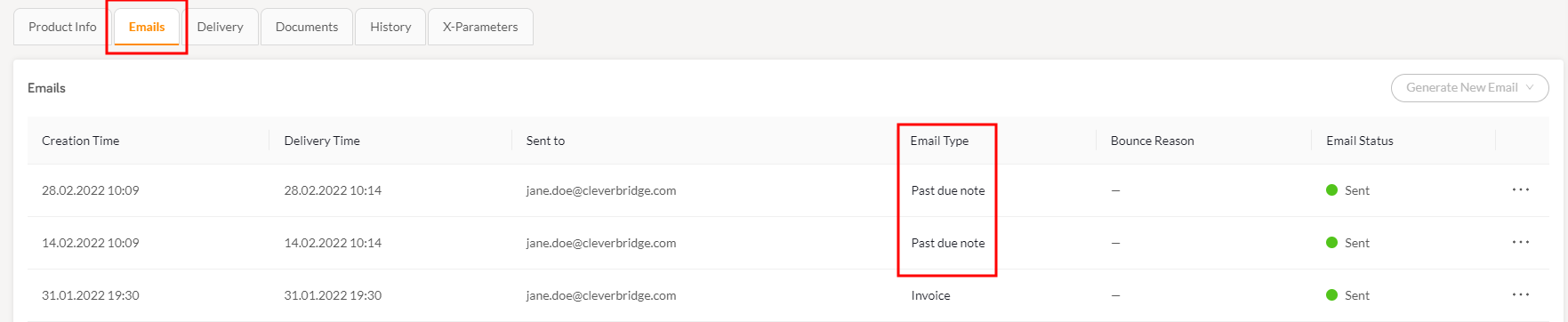
You can also access the data from the History tab 
When using Test orders, they are automatically exempt from the PDN process to prevent payment delinquency notices and any related follow-up actions from being sent for non-billable transactions. This helps avoid confusing or unintended dunning emails, keeps your reporting clean, and ensures you can validate your setup without triggering customer-facing collections communication.