Mastering the customer journey with Cleverbridge
Overview
Winning in digital commerce starts with the customer. The Cleverbridge platform supports each stage of the customer journey, from the first interaction through purchase, expansion, renewal, and reactivation.
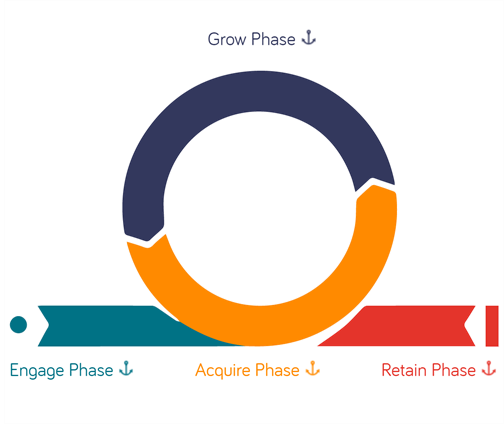
The journey in this guide has four phases:
- Engage: Reach potential customers and make the first interaction relevant.
- Acquire: Help buyers evaluate, trust, and purchase your product.
- Grow: Make it easy for customers to add products, features, seats, or usage.
- Retain: Simplify renewal, recover failed payments, and support long-term relationships.
Engage
In the engage phase, potential customers are learning who you are and whether your product fits their needs. Meet them with relevant content, pricing, and offers in their market and language. Give them a clear path to try or buy when they are ready.
Activate publishers and partners
Reach customers through affiliates, referral partners, resellers, publishers, and marketplace partners. CleverPartners helps you recruit, onboard, manage, and reward B2B partners. Existing Partnerize programs provide additional workflows for managing publishers and partners through the Partner Portal.
- Learn more: Explore CleverPartners; Learn about Partnerize; Manage a Partnerize partner; Use Partner Portal.
Show a familiar, local experience
Apply the appropriate language, currency, taxes, address formats, and legal notices for each buyer's location. A familiar experience builds trust and makes the path to purchase easier.
- Learn more: Understand checkout value; Manage international taxation.
Customize pricing
Adapt pricing to the customer's region, segment, or buying context. You can configure regional prices, apply local rounding, display tax-inclusive amounts, and synchronize prices with your website or application.
- Learn more: Add a price configuration; Add a price rule; Use the Pricing API.
Offer free trials
Let potential customers experience your product before they commit. Define the trial period, communicate when billing starts, and provide a clear path from trial to paid access.
- Learn more: Acquire subscription customers with free trials.
Acquire
In the acquire phase, customers need clarity, confidence, and convenience. Keep product information and pricing consistent, present relevant incentives, and provide a checkout that clearly explains what the customer is buying and how much it costs.
Provide clear product information
Keep plans, features, entitlements, prices, and terms consistent across your website, application, and checkout. The product customers select should match the product and access they receive.
- Learn more: Explore products and selections; Display your product line with catalogs; Use the Cart API.
Convert with targeted incentives
Present the right plan, bundle, add-on, or discount for the customer's context. Make savings clear and apply eligible discounts automatically when possible, so customers do not need to search for a code or compare conflicting offers.
Support B2B purchasing
Give business customers the documents and approval options they need before purchase. Use quotes to present products, pricing, and terms before an order is placed.
Quotes can support internal budgeting, procurement approval, and quote-to-purchase-order workflows for businesses, educational institutions, and government agencies.
- Learn more: Understand quotes for new and existing orders; Use quotes; Create and manage quotes for initial orders.
Offer a familiar checkout
Use the appropriate language, currency, address format, tax display, legal notices, and payment methods for the customer's location. Show totals before the customer confirms the order. Choose a full-page, pop-up, embedded, or in-app storefront to match the buying context.
- Learn more: Offer global payments; Understand checkout value; Choose a storefront integration option; Explore optimized checkouts.
Keep momentum to conversion
Let customers purchase, upgrade, or renew inside your product when that creates the most direct experience. Prefill known information and show relevant local payment methods to reduce repeated work and context switching.
Use payment orchestration, fraud screening, and retries to help legitimate customers complete payment. When a payment fails, provide a clear explanation and a direct way to update payment details.
- Learn more: Integrate a storefront into an application; Minimize chargebacks; Collect failed online payments automatically; Explore conversion rate optimization.
Build trust at checkout
Use a branded store hostname and TLS certificate, show clear tax-inclusive totals where required, provide company information, and explain invoice and receipt options. Display applicable legal notices and compliance information without interrupting the purchase flow.
- Learn more: Use a branded storefront hostname and TLS certificate; Review invoicing requirements; Ensure global compliance.
Grow
In the grow phase, customers expand their relationship with your product. Make changes easy to understand and complete. Show when changes take effect, explain proration, and display updated totals before confirmation.
Add-ons and upgrades, without friction
Offer relevant add-ons and plan upgrades in your application and customer communications. Let customers apply a change immediately or at the next billing date when supported. Clearly show proration, tax, the new total, and the effective date.
For B2B customers, upgrade quotes can support internal approval before a scheduled subscription change takes effect.
- Learn more: Upgrade subscriptions; Use quotes for subscription changes.
Let customers add seats or users
Allow customers to adjust subscription quantities as their teams change. Show whether a quantity change applies immediately or at renewal, and preview the resulting charges. Keep access uninterrupted and provide confirmation of the new quantity and billing schedule.
- Learn more: Configure the customer self-service experience; Change the renewal quantity; Customize the renewal price and quantity.
Support usage-based pricing
Align charges with customer usage. Define how usage is measured, when thresholds apply, and how the resulting charge appears. Communicate usage and billing rules clearly so customers can predict their costs.
- Learn more: Bill a customer for usage; Bill a customer for excess usage; Bill usage at a custom price.
Retain
In the retain phase, customers need predictable renewals, clear communication, and control over their subscription. Combine advance notices, self-service, payment recovery, and honest cancellation experiences to maintain trust.
Offer subscription self-service
Let customers update payment and contact details, change quantities, review invoices, and manage renewal settings on their schedule. Self-service reduces support requests and gives customers more control.
The Subscription Management Portal provides customers with a secure, hosted interface for reviewing subscription details, documents, payment methods, and available subscription actions.
- Learn more: Explore Subscription Management Portal; Learn about Subscription Management Portal; Configure the customer experience; Manage subscriptions.
Communicate at the right moments
Send clear, actionable messages when customers start a subscription, approach renewal, need to update a payment method, or experience a failed payment. Explain what happened, what will happen next, and what action the customer needs to take.
- Learn more: Review customer email types; Use email marketing services.
Reduce involuntary churn
Use payment retries, account updater services, expiration checks, and payment reminders to recover failed payments. Give customers a direct way to resolve an issue before it interrupts access.
Make downgrades and cancellations honest and easy
Provide clear downgrade and cancellation options. Explain the effective date and any remaining access, collect feedback without blocking the customer, and make reactivation straightforward if the customer returns.
- Learn more: Manage subscription cancellations; Reduce churn with cancellation flows; Downgrade a subscription on the next billing date; Cancel part of a multi-item subscription.
Run win-back programs
Re-engage inactive customers with offers that match their previous product and reason for leaving. You can provide temporary access, adjust a billing date, offer a targeted discount, or create another low-friction path back to a paid subscription. Keep the terms and end date clear.
- Learn more: Replace a subscription with a free-access period; Offer free service when reactivating a subscription.
Capabilities that support every phase
Some Cleverbridge capabilities apply across the entire customer journey.
Support your customers
Help customers find answers, retrieve orders, manage subscriptions, request refunds, and contact support. Make support and self-service available before, during, and after purchase.
- Learn more: Support for your customers; Learn how customers find answers; Understand how customers contact support.
Analyze customer and business performance
Use customer behavior, subscription, payment, revenue, and retention data to understand performance and identify opportunities for improvement.
- Learn more: Analyze and report using SCM; Track customer behavior.
Connect Cleverbridge with other systems
Connect checkout events and commerce data with analytics, advertising, attribution, marketing, sales, and operational systems. Use managed integrations or build a custom integration when needed.
- Learn more: Explore integrations; Use analytics and tracking integrations; Explore the Developer Documentation.
Meet tax, invoicing, and compliance requirements
Apply regional tax, invoicing, payment, security, and data-protection requirements throughout purchase, billing, renewal, and refund workflows.
Putting it together
Cleverbridge supports the customer journey from first engagement through renewal and reactivation:
- Engage: Reach customers through partner channels, present local pricing, and offer trials.
- Acquire: Provide consistent product information, support B2B purchasing, present relevant incentives, and deliver a localized checkout.
- Grow: Support upgrades, add-ons, quantity changes, and usage-based pricing with transparent totals.
- Retain: Automate renewals and payment recovery, provide self-service, and make cancellation and reactivation clear.
Customer support, analytics, integrations, tax, invoicing, security, and compliance strengthen every phase of the journey.
See more examples in the Cleverbridge client stories.