UPI (India)
UPI (Unified Payments Interface) is a real-time payment system developed by the National Payments Corporation of India (NPCI) that allows people to send and receive money instantly using UPI applications. UPI is one of the most used digital payment methods in India. It enables seamless and instant bank-to-bank transfers without needing to share detailed bank information every time. Full list of available applications is available on the NPCI webpage.
This can be used for both one-time payments and subscription. Recurring payments are performed through e-mandates (also known as UPI AutoPay).
To add UPI to your checkout, contact our Client Experience.
UPI Flow
While you can find some peculiarities of one-time and subscription payments below, the general flow is rather simple:
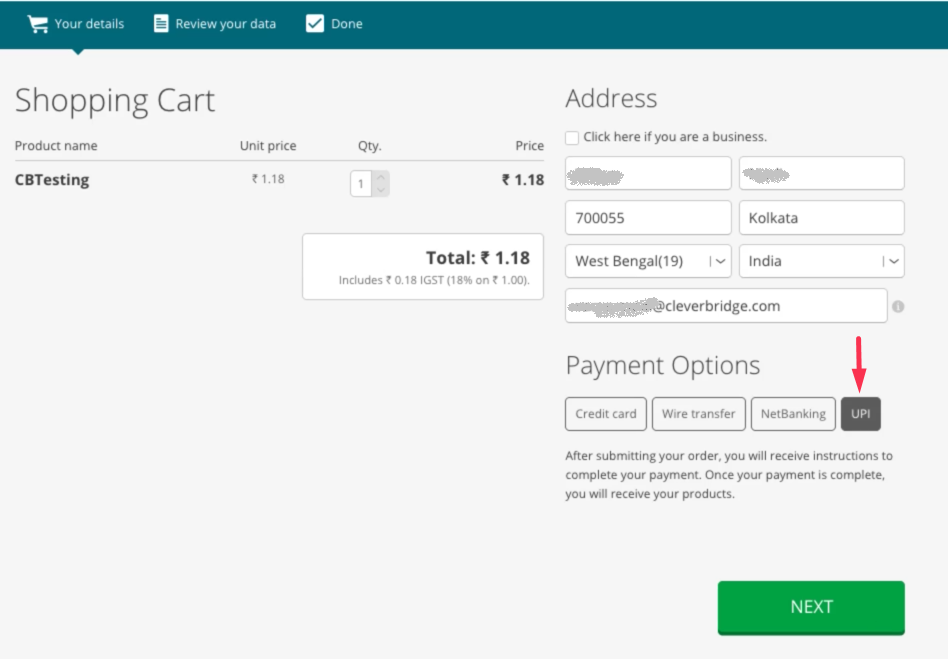
- Customer chooses UPI as the payment method on the checkout page and continues.
- Customer reviews the order and confirms the purchase. Cleverbridge sets the purchase status to Awaiting Offline Payment.
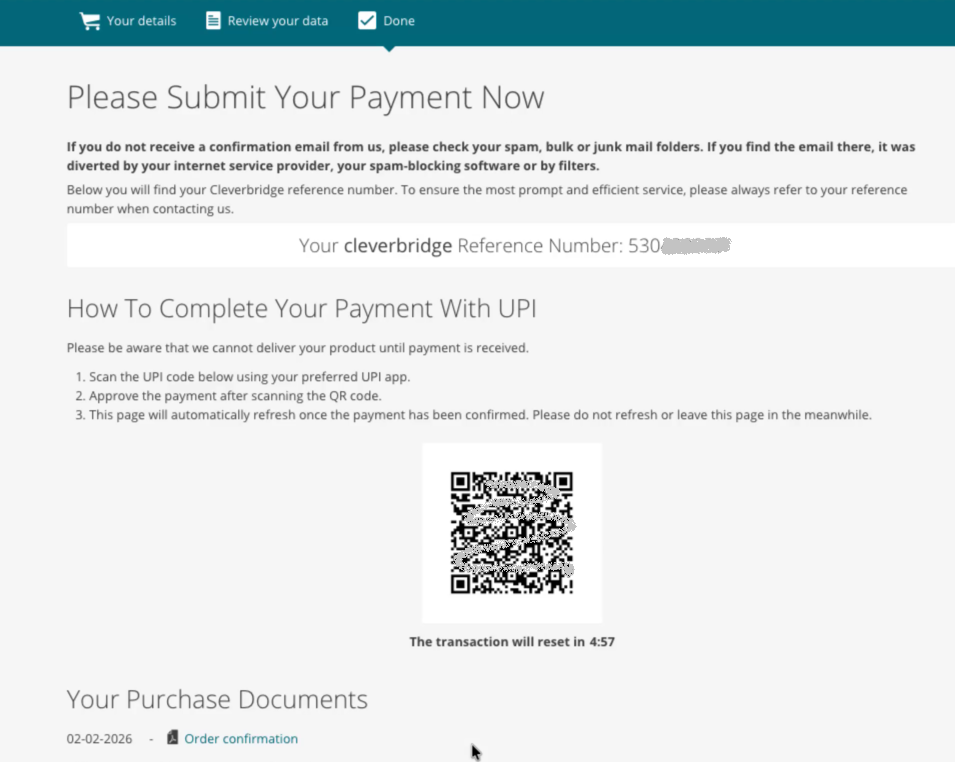
- Customer is redirected to a confirmation page with a dynamic UPI QR code. Customer scans the QR code using a UPI app of their choice and approves the payment. This flow is specific to a chosen app, however, it can include scanning the QR code, selecting a linked bank account, and approving the request by entering the UPI PIN.
- Upon success, Cleverbridge updates the purchase status to Paid.
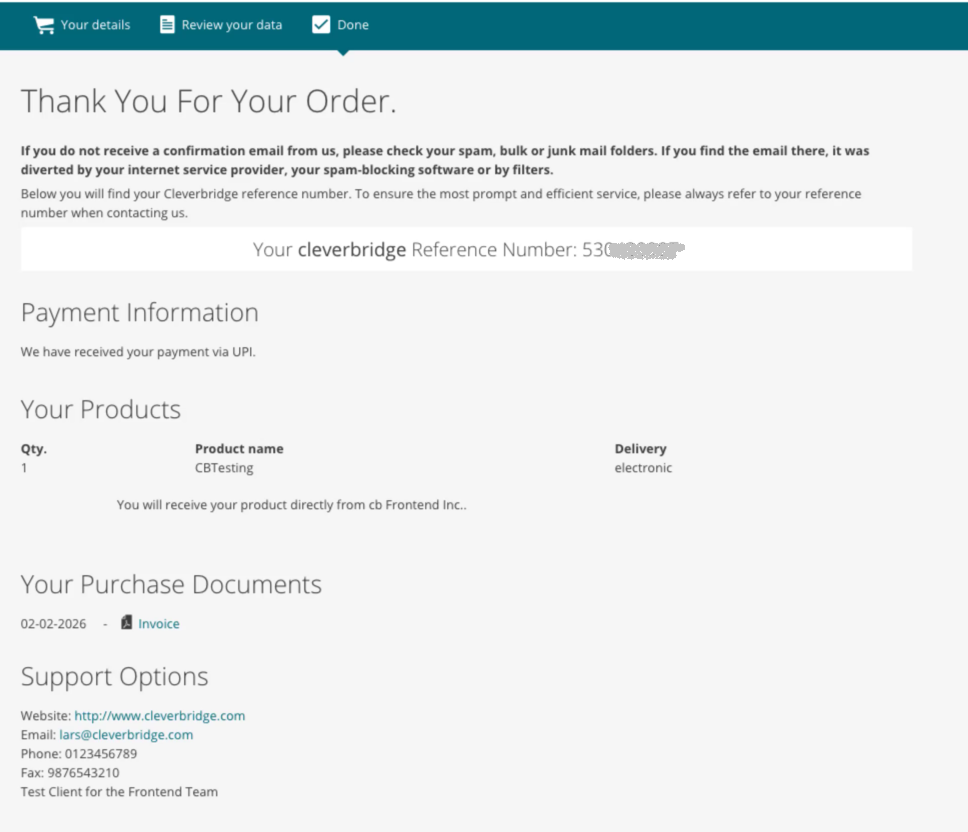
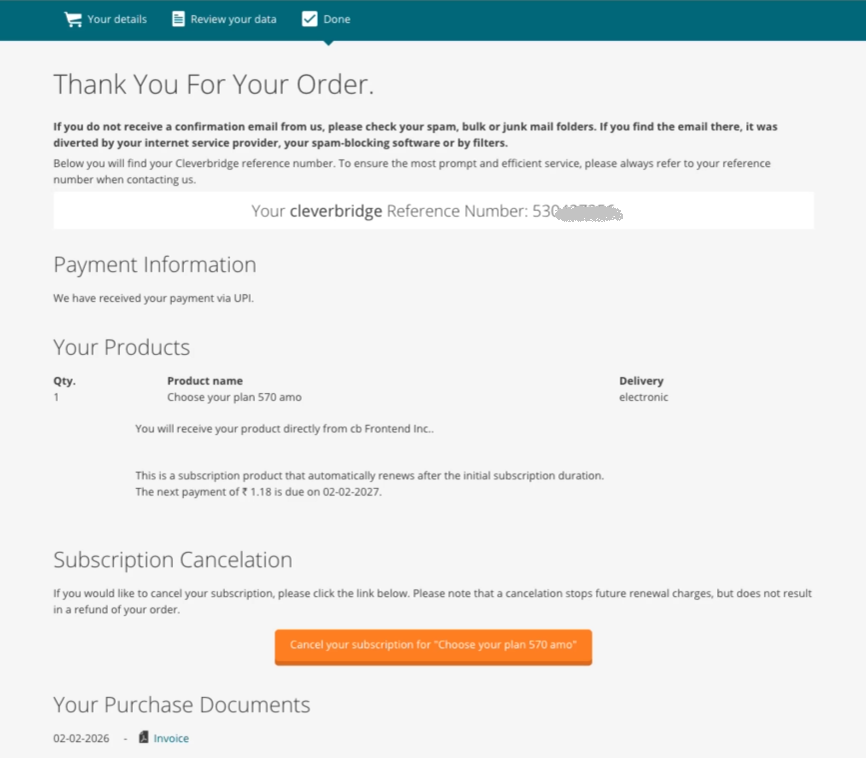
- The confirmation page is updated, and the invoice becomes available.
Processing typically completes within a few seconds after the customer approves the request in the UPI app.
The QR code is valid for 5 minutes. If the customer does not complete the payment within this time:
- The QR code expires.
- The transaction remains in Awaiting Offline Payment status.
- The page refreshes automatically.
- The customer must click Pay Now to generate a new QR code.
UPI supports both one-time payments and subscriptions. For recurring payments, customers authorize a mandate (also known as UPI AutoPay) in their UPI app, which allows you to charge them automatically for future payments within the mandate terms.
Maximum supported amount of a UPI payment is INR 100,000.
Please select a corresponding tab for further details:
- One-Time Payments
- Subscriptions
Detailed UPI flow (one-time payment)
Screenshots are for illustration purposes only. The actual experience may vary depending on your checkout configuration and the customer’s UPI app.
-
On the Cleverbridge checkout page, the customer selects UPI as the payment method.
-
The customer reviews the order and confirms the purchase details.
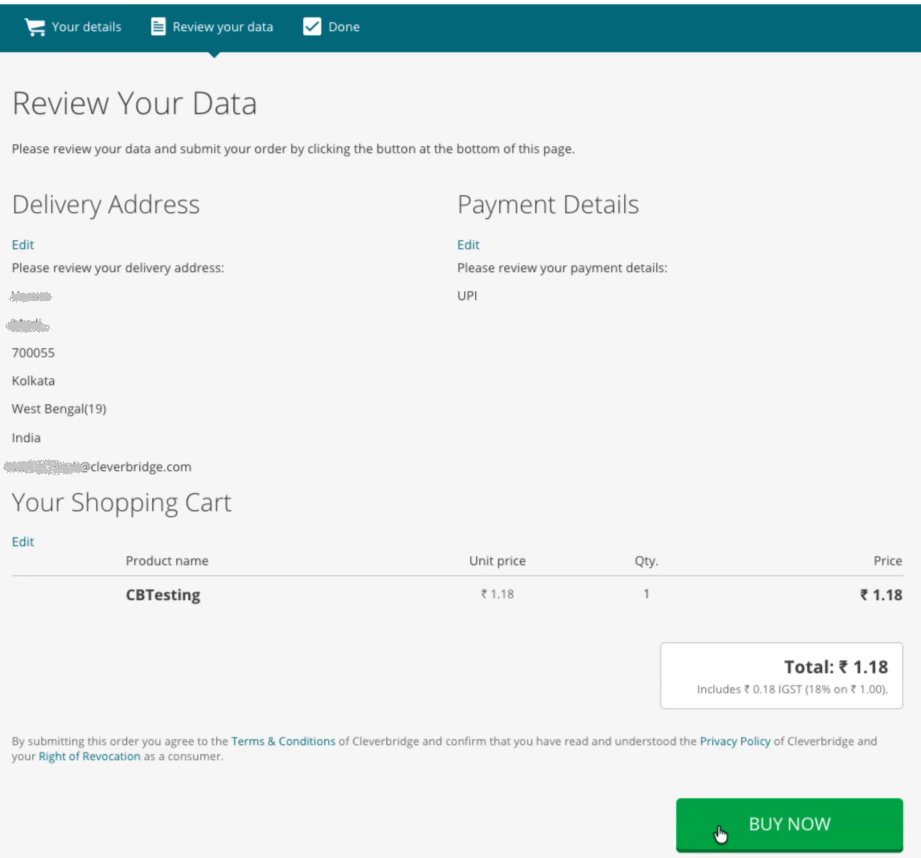
When the customer confirms the order, Cleverbridge:
- Creates the purchase.
- Sets the purchase status to Awaiting Offline Payment.
- Generates a dynamic UPI QR code.
-
The customer is redirected to the confirmation page where the QR code is displayed.
 important
The QR code is valid for 5 minutes. If the QR code expires, the page refreshes automatically and the customer must generate a new QR code.
-
The customer opens their preferred UPI app and follows the in-app prompts to authorize the payment. (Scans the QR code, selects one of the linked bank accounts, and approves the payment by entering the UPI PIN).
-
Cleverbridge automatically updates the order to Paid, and update the confirmation page. Now the invoice is available for download.
Detailed UPI flow (Subscriptions)
For subscription payments, UPI supports UPI AutoPay which allows the creation of a recurring mandate.
The mandate is created for each subscription. The maximum mandate validity period is 30 years.
UPI mandate amount limitations
UPI has limitation and requirements related to the payment amount and mandate generation.
Payments above INR 100K are not supported. See the table for further details:
| Amount (INR) | Initial Payment | Recurring Payment (Renewal) |
|---|---|---|
| Under 15K | In the UPI application Customer scans the QR code, approves the mandate that will be used for renewals, and approves the initial transaction. | The payment is processed automatically using UPI AutoPay. No customer intervention required. |
| 15K to 25K | Customer receives a pre-debit notification (subject to the UPI app settings, it can be delivered via the UPI app, SMS, or WhatsApp). note There must be a 24-hour waiting period between the pre-debit notification and the actual charge. | |
| 25K to 100K | No mandate is created. Customer must scan the QR code and confirm payment for each rebilling (both for the initial and renewals). | |
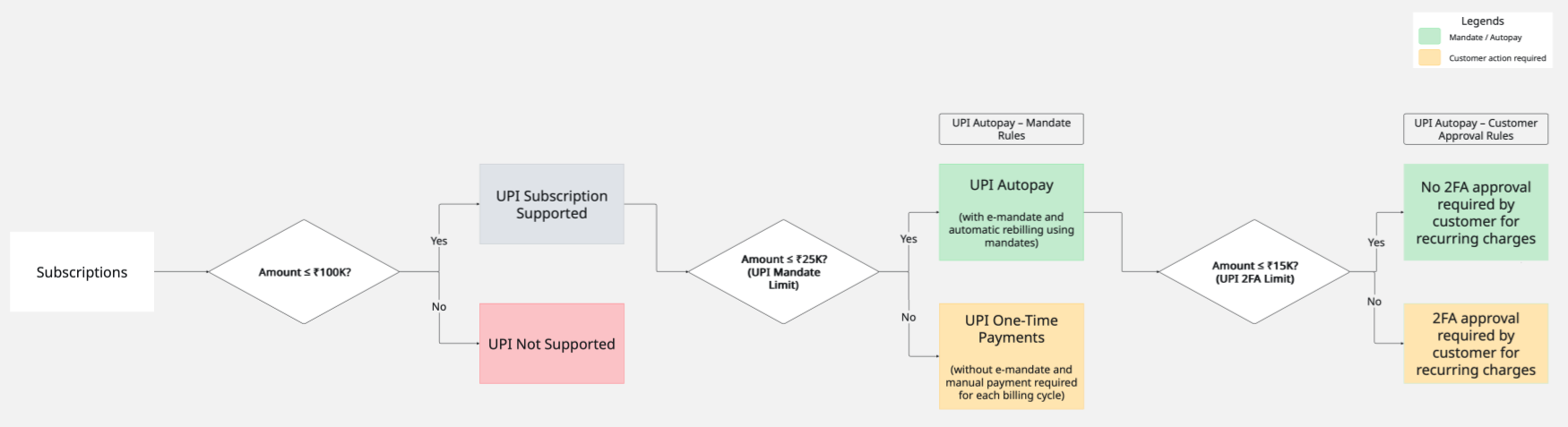
Processing subscription payments via UPI
Screenshots are for illustration purposes only. The actual experience may vary depending on your checkout configuration and the customer’s UPI app.
-
On the Cleverbridge checkout page, the customer selects UPI as the payment method.
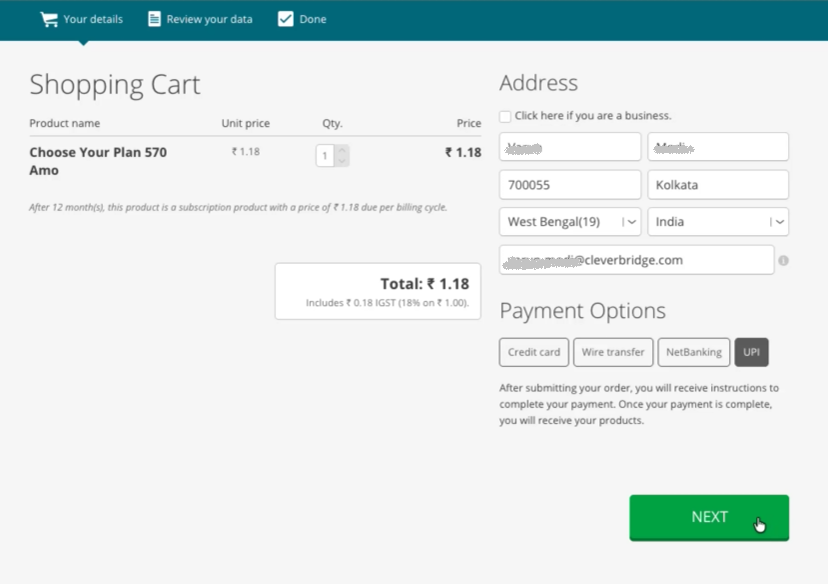
-
The customer reviews the subscription details and confirms the order.
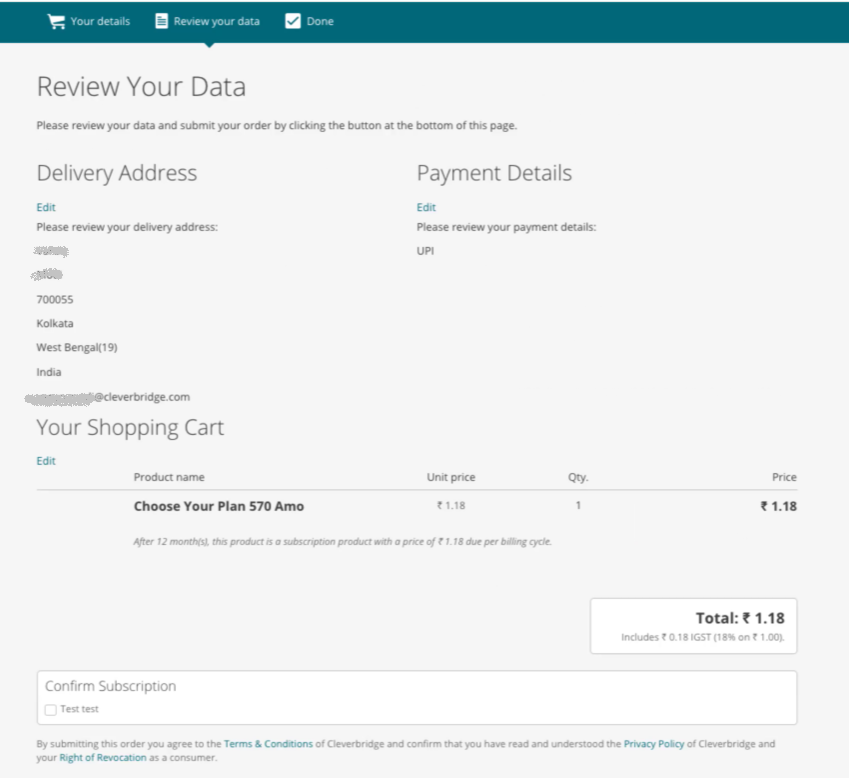
When the customer confirms the order, Cleverbridge:
- Creates the purchase.
- Sets the purchase status to Awaiting Offline Payment.
- Generates a dynamic QR code.
-
The customer is redirected to the confirmation page where the QR code is displayed.
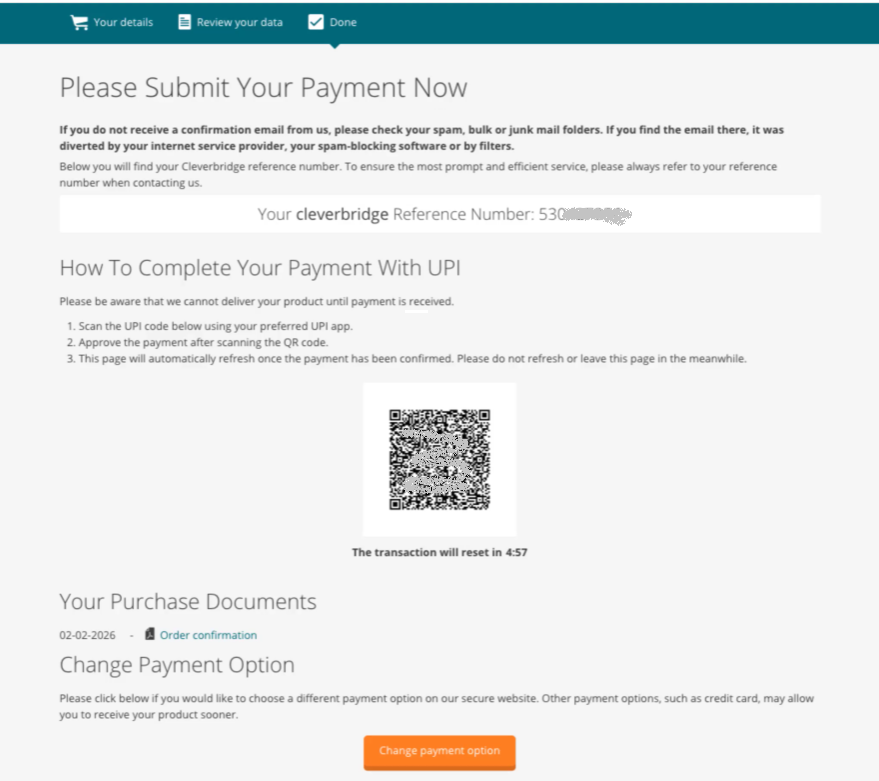
-
The customer scans the QR code using a UPI app. The customer can review and confirm the initial payment amount. Subject to the payment amount limitation, the application may direct the customer to confirm details of the mandate and future recurring charges.
-
Cleverbridge automatically updates the order to Paid, and the confirmation page is updated.
Mandate Lifecycle (UPI AutoPay)
When a subscription uses UPI AutoPay, the mandate follows this lifecycle:
| Stage | Description | Key Details |
|---|---|---|
| 1. Mandate Creation | Mandate is created during the initial subscription payment. |
|
| 2. Pre-Debit Notification | Notification sent before each renewal. |
|
| 3. Recurring Charge (MIT) | Charge initiated after waiting period. |
|
| 4. Mandate Expiry or Cancellation | Mandate becomes inactive. | May occur due to:
If so, future charges will fail and the Customer must define a new payment method. Mandate cancellation stops future renewals but does not refund completed payments. |
Switch existing subscription to UPI
UPI can be selected as the payment method when creating a new subscription (as described above). You can also switch an existing subscription to UPI. In that case, the customer scans the QR code, which opens their UPI app and prompts them to confirm that UPI will be used for future renewals. You might be charged an initial authorization amount (usually around INR 2), which is automatically refunded within the next 24-48 hours.
Handling refunds
UPI payment refunds are supported through the standard Cleverbridge refund flow, and refunds are returned to the original bank account linked to the customer’s UPI app. The exact refund timeline depends on the customer’s bank processing.