Add a product
Products define what customers can buy, how offers appear in the cart, and how purchases are priced and delivered. Setting up products correctly helps you create a clear checkout experience, reuse product information where possible, and support different business models such as one-time purchases, subscriptions, and bundles.
Use this page as the starting point for creating products in SCM.
General workflow
- Decide which product type you need.
- Go to Configure > Manage Products.
- Open the three-dot menu and select the product type you want to create.
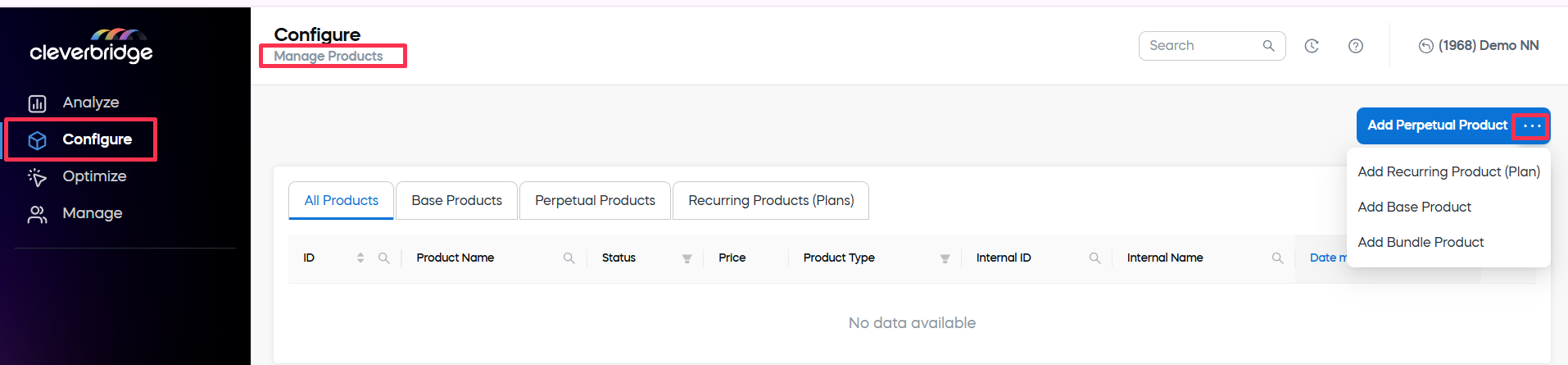
- Complete the product-type-specific settings.
- Complete the shared product settings.
- Click Save and Close.
Product types
Cleverbridge supports different product types and setup options so you can model your catalog around how you sell. You can create reusable templates, sell one-time products or subscriptions, and bundle products together. Choosing the right setup helps you maintain product data more easily, configure pricing and delivery correctly, and give customers a clearer buying experience.
The following product types are available for product setup in SCM:
| Type | Use it when |
|---|---|
| Base product | Use a base product when several perpetual or recurring products share the same visible information, internal information, attributes, or delivery setup. A base product works as a reusable template whose information can be inherited by child products. |
| Perpetual product | Use a perpetual product when customers purchase the product once for a one-time payment. This setup is best for products or services that do not renew automatically. |
| Recurring product (plan) | Use a recurring product when customers subscribe and pay at recurring billing intervals. This setup includes subscription interval settings and subscription-specific delivery behavior. |
| Bundle product | Use a bundle product when you want to sell multiple products together under one bundle ID and at a set price. Bundled products must remain together during the ordering process and cannot be removed individually by the customer. |
Product settings
Each product type has its own setup page with the settings that are relevant for that product. Product setup usually combines shared product settings, such as general information, product category, attributes, pricing, and delivery, with product-type-specific options, such as subscription settings for recurring products or bundle contents for bundle products.
Explore this section
Add a base product
A base product is a template that you can use to create an assortment of perpetual or recurring products with similar characteristics.
Add a perpetual product
Perpetual products are software or services that customers can purchase for a one-time payment.
Add a recurring product
Recurring products are software or services that customers can subscribe to for a recurring payment.
Add a bundle product
You can choose products to include in a bundle and offer them together at a set price.