Offer Bank Transfer via KCP payments
Overview
Bank Transfer via KCP is a redirect-based online banking method for customers in South Korea. The customer selects the method in Cleverbridge, continues in the hosted KCP flow, and authorizes the payment through a supported Korean bank.
Bank Transfer via KCP is available only in Checkout 2.0 when the customer's country is South Korea and the checkout currency is Korean won (KRW).
To add Bank Transfer via KCP to your checkout, contact Client Experience.
This page explains Bank Transfer via KCP from the client's perspective. You can share the Pay with Bank Transfer via KCP guide with customers who need help completing a payment.
Bank Transfer via KCP at a glance
Supported banks
Bank Transfer via KCP gives customers access to several dozen Korean banks through the hosted payment flow. Availability can change as participating banks are added or removed, so the list below is a current reference rather than an exhaustive directory. For the provider's latest list, see Available banks.
View supported banks
-
Busan Bank
-
Daegu Bank
-
Gwangju Bank
-
Hana Bank
-
IBK Bank
-
Jeju Bank
-
Jeonbuk Bank
-
KB Bank
-
KDB Bank
-
Korea Citibank
-
Kyongnam Bank
-
MG Community Credit Cooperatives Bank
-
National Credit Union Federation of Korea Bank
-
National Forestry Cooperative Federation Bank
-
NH Bank
-
Post Office Bank
-
SC Bank
-
Shinhan Bank
-
Suhyub Bank
-
Woori Bank
-
Daewoo Securities
-
Daishin Securities
-
Dongbu Securities
-
Eugene Investment
-
Hana Financial Investment
-
Hanhwa Securities
-
HI Investment & Securities
-
HMC Investment & Securities
-
Hyundai Securities
-
Korea Investment & Securities
-
Meritz Securities
-
Mirae Asset Securities
-
NH Investment & Securities
-
Samsung Securities
-
Shinhan Investment
-
Shinyoung Securities
-
SK Securities
-
Yuanta Securities
Why offer Bank Transfer via KCP?
Bank Transfer via KCP gives customers in South Korea a familiar way to pay directly from their bank account without entering card details.
By supporting several dozen Korean banks through a local Korean payment flow, Bank Transfer via KCP can help you meet customers in an established banking channel and provide a practical alternative to cards and digital wallets.
Cleverbridge order flow
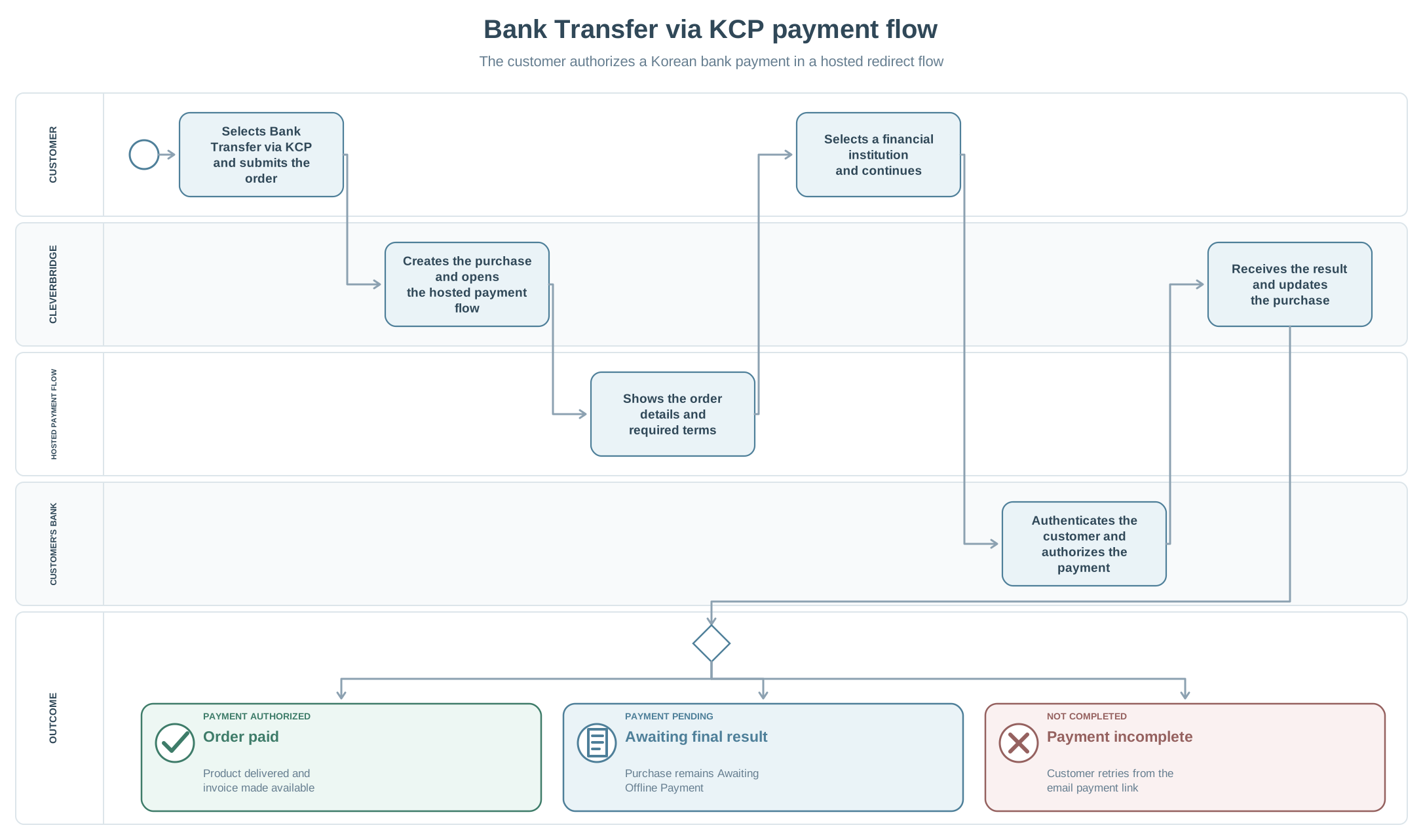
- The customer selects Bank Transfer via KCP in Checkout 2.0 and selects Buy now.
- Cleverbridge redirects the customer to the hosted KCP payment flow.
- The customer reviews their name, the product, and the amount, and then continues to the payment terms.
- The customer accepts the required terms and continues to the bank-selection step.
- The customer selects a bank and follows its authentication and authorization process.
- After the payment flow finishes, the customer returns to the Cleverbridge confirmation page.
- Cleverbridge updates the purchase after receiving the payment result. After successful payment confirmation, the product is delivered and the invoice becomes available.
The screens and authentication steps after the redirect are controlled by the payment service and the customer's bank. They can vary by bank and can change independently of the Cleverbridge checkout.
While Cleverbridge waits for a final payment result, the purchase remains Awaiting Offline Payment. This includes cases where the customer leaves the KCP flow without completing it. After an authorized payment, the purchase changes to Paid, the product is delivered, and the invoice becomes available. If KCP rejects the payment, Cleverbridge shows Payment not authorized and records the transaction status as Rejected.
Incomplete and rejected payments
If the customer does not finish the hosted payment flow, Cleverbridge returns them to a Complete your payment page. The purchase remains Awaiting Offline Payment because Cleverbridge has not received an authorization or rejection.
The confirmation page does not provide a link back to the KCP payment flow. To try again, the customer uses the payment link in the Cleverbridge email for the order. An authorized client user can also locate the purchase in SCM, open the email under Purchase Details > Emails, and provide its payment link to the customer. For instructions, see Manage customer emails. The link remains available after an incomplete attempt and returns the customer to the hosted payment flow.
If KCP rejects the payment, the transaction status is Rejected. The customer sees Payment not authorized and receives retry instructions by email.
The email also contains a Change Payment link. The current change-payment flow uses Checkout 1.0, where Bank Transfer via KCP is not available. To retry with KCP, the customer must use the payment link in the email rather than Change Payment.
Subscriptions and renewals
Bank Transfer via KCP can be used to purchase a subscription, but it does not create a reusable payment authorization. The customer must complete a new bank payment manually for every renewal, regardless of the amount.
At renewal, Cleverbridge sends the customer a payment reminder with a link to complete the payment. If payment is not received, the subscription follows the standard offline-payment lifecycle and can move to Hold. After Cleverbridge receives payment confirmation, the purchase status changes to Paid.
Refunds
Bank Transfer via KCP supports full and partial refunds. Use the standard Cleverbridge refund workflow. For available refund options and instructions, see Handle refunds.
Refund processing is asynchronous, and the receiving bank can affect when the refunded amount appears.