
Product attribute settings

Product attributes define additional product information used for customer-facing presentation, marketing content, order quantity restrictions, cart details, and product selection text.

Use attributes to add product details that help customers understand what they are buying, compare product options, confirm compatibility, and understand delivery-related information.

Used by product type

Product typeHow attributes are used
Base productStores reusable attribute information that perpetual or recurring products can inherit.
Perpetual productDefines product details, marketing descriptions, cart information, and selection text for a one-time purchase product.
Recurring product (plan)Defines product details, marketing descriptions, cart information, and selection text for a subscription product.
Bundle productDefines product details, marketing descriptions, cart information, and selection text for a group of products sold together.
Preview formatted content

Some attribute fields support formatted text or HTML. Before saving customer-facing text, use the editor toolbar and Show Preview toggle to check formatting, links, images, lists, and placeholders.

Basic product attributes

Basic product attributes define key product details and order quantity restrictions.
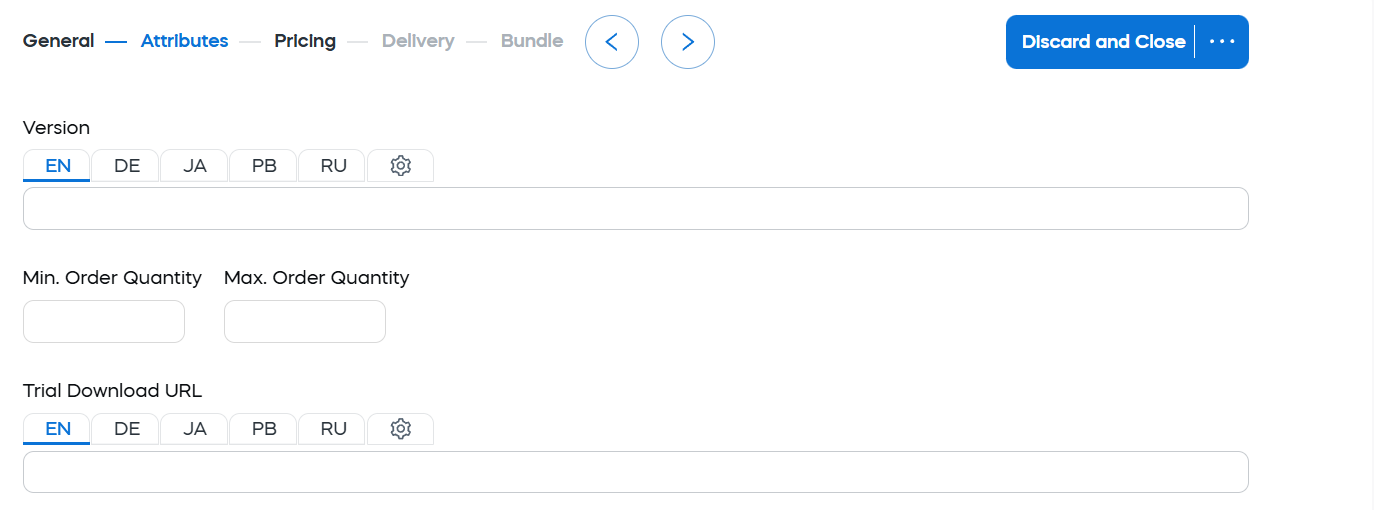
Product attributes

FieldDescriptionUse to
VersionProduct version. Depending on the configuration template, it can be displayed in checkout.Help customers distinguish product versions or releases, especially when several versions remain available at the same time.
Min. Order QuantityMinimum quantity that can be purchased for this product in one order.Prevent orders below a required quantity, such as volume-based offers, minimum license packs, or products that should not be purchased as a single unit.
Max. Order QuantityMaximum quantity that can be purchased for this product in one order.Limit the number of units that can be purchased in one order, for example for limited offers or products with quantity restrictions.
Trial Download URLURL to a trial version of the product, if applicable.Give customers access to the correct trial version from checkout or related pages.

Before setting quantity restrictions, consider how they interact with pricing, product selections, promotions, and customer expectations in the cart.

Descriptions for marketing purposes

Descriptions for marketing purposes define customer-facing product descriptions that can appear in the shopping cart.
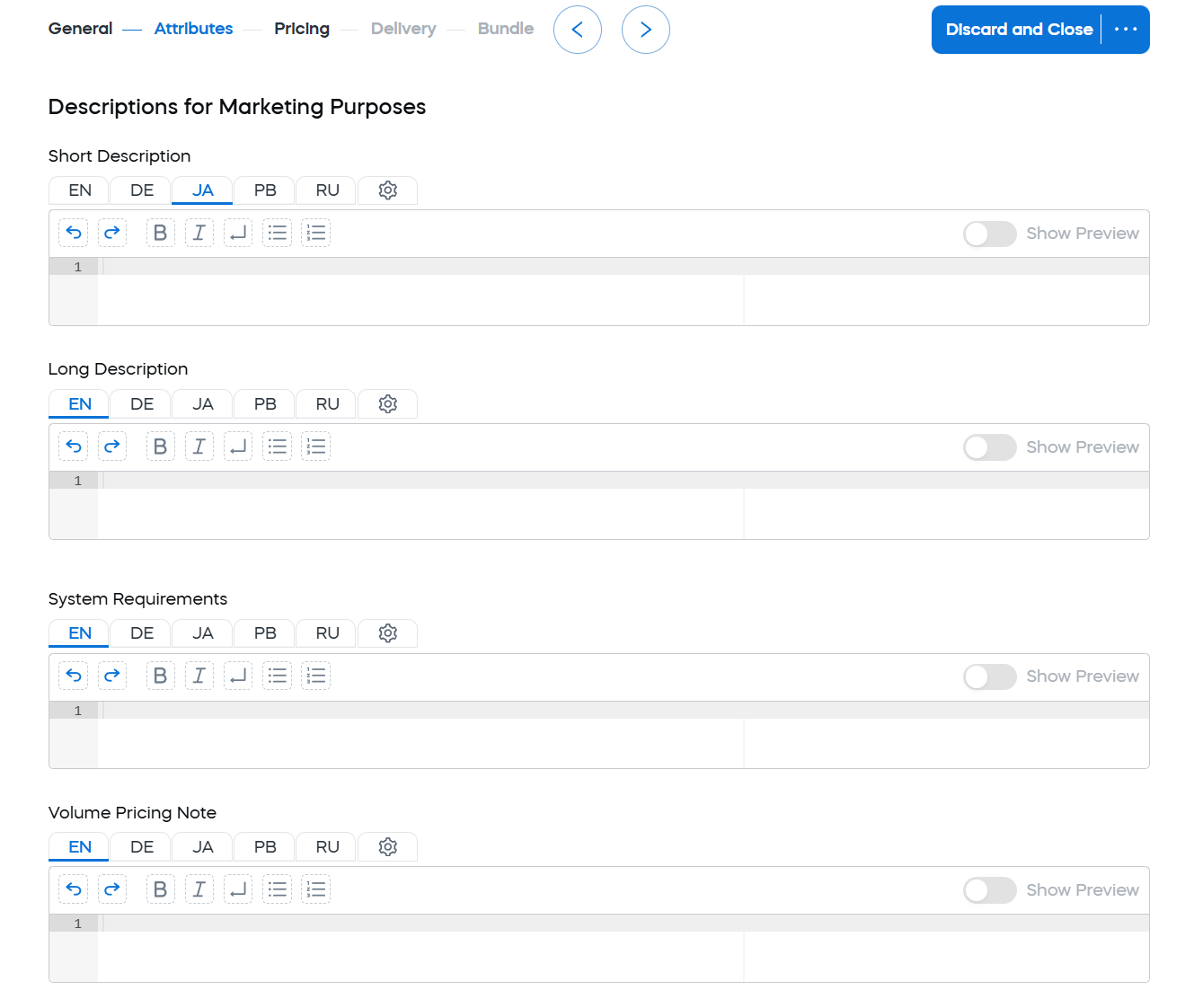
Descriptions for marketing purposes

FieldDescriptionUse to
Short DescriptionShorter product description used in the shopping cart. Typically limited to one or two sentences. HTML is allowed, but not usually recommended for this field.Give customers quick additional context about the product during checkout.
Long DescriptionLonger text or HTML description used in the shopping cart.Provide more detailed product information when the content spans multiple lines, includes lists, or needs more structure.
System RequirementsSystem requirements that can appear in the shopping cart.Help customers confirm compatibility before purchase, such as operating system, platform, hardware, software dependencies, or supported versions.
Volume Pricing NoteText displayed in the Volume discount pop-up window in the cart.Explain volume pricing, discount tiers, bulk-purchase conditions, or how to request pricing for larger orders.

Keep product descriptions customer-facing. Avoid internal terminology, operational notes, or information that is only useful to internal teams.

Shopping cart attributes

Shopping cart attributes define additional customer-facing information that appears in the cart or delivery-related parts of the order flow.
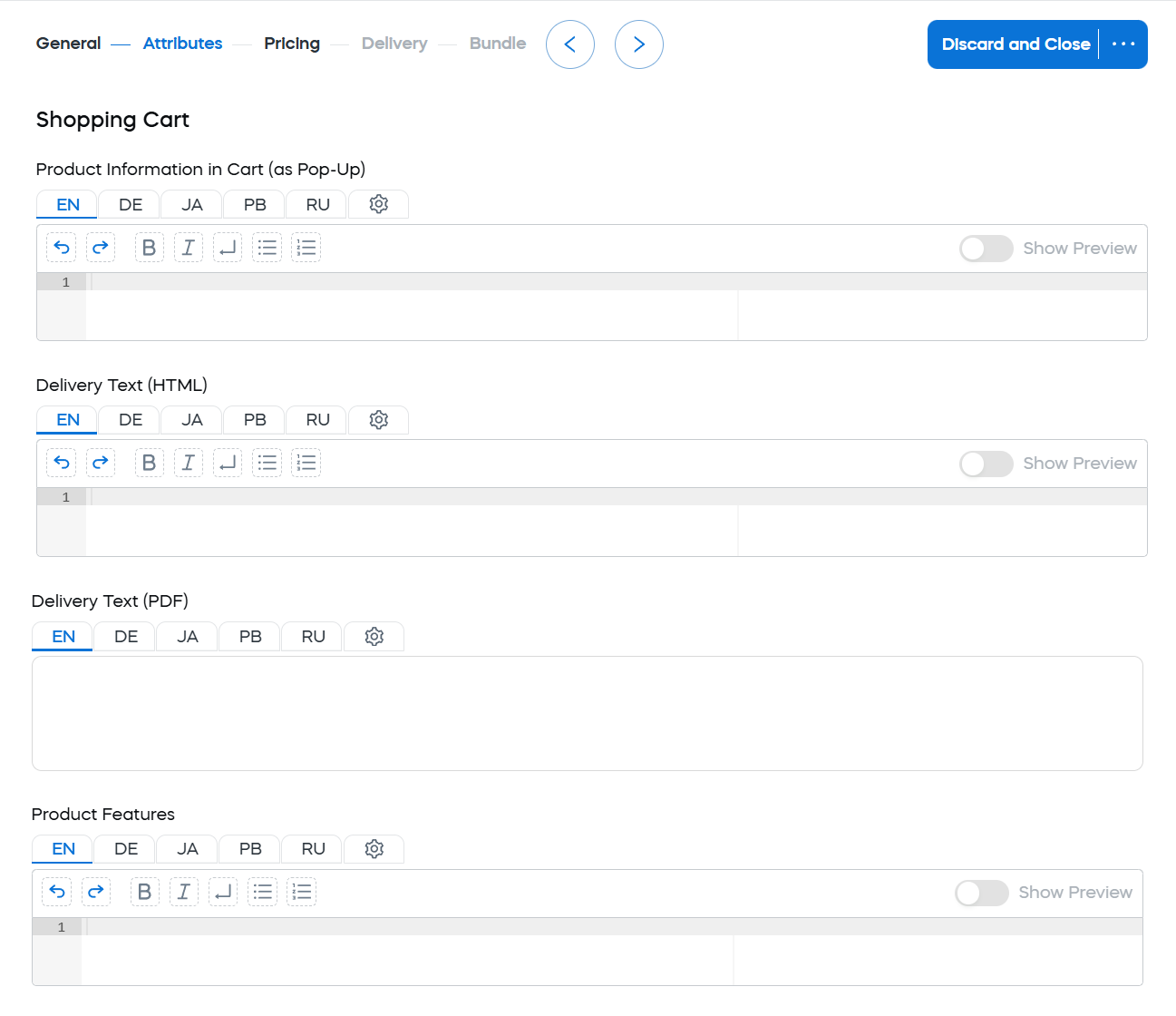
Cart information

FieldDescriptionUse to
Product Information in Cart (as Pop-Up)Content that appears inside a pop-up in the cart.Provide supporting information that is useful during checkout but too long for the main cart view, such as product details, installation notes, feature explanations, or an image with supporting text.
See more details below
Delivery Text (HTML)Product delivery information, such as download or email instructions, shown in the delivery section of the cart.Explain how the product is delivered in the cart, including download instructions, email delivery information, activation steps, or other delivery-related details.
Delivery Text (PDF)Product delivery information shown in a PDF order confirmation document.Provide delivery instructions in PDF order confirmation documents. Because PDF confirmation documents do not support HTML in the same way as the cart, use plain text for this field.
Product FeaturesShort feature descriptions that can appear under product versions in the cart.Help customers compare product versions in a selection, such as Basic, Professional, or Enterprise editions. Highlight differences such as functionality, service levels, license limits, supported platforms, or other benefits.
See example below

Information pop-up HTML details

To add a reference to an image, use the following HTML and include your client account ID and image name:

<img src=mycontent/client account ID/image name>
note

To reference an image, you must first upload it to Web Files in Commerce Assistant (CA). For more information, see Web files.

Example

The following example shows how pop-up information in the cart can be formatted:

<table>
<tr>
<td><img src=/mycontent/123/GenericBoxshotSmall.png> </td>
<td>
<h1>Internet Security Basic Extended</h1>
<p>Anti-virus software for personal use. This product offers virus protection, anti-phishing tools, email protection, and identity theft protection. It removes worms and eliminates malware. Protect your Internet browsing, online banking, social networking, and more.</p><br />
</td>
</tr>
</table>

Product features HTML example

Use Product Features to help customers compare options. Do not repeat the full product description.

Example

The following example shows how product features can be defined:

<ul>
<li>Advanced antivirus and malware protection</li>
<li>Email and phishing protection</li>
<li>Identity theft protection</li>
<li>Secure online banking and browsing</li>
</ul>

Selection text

Selection text lets you define customer-facing text for product options in the cart.

Selection text

FieldDescriptionUse to
Selection TextCustomer-facing label used to present selectable product options in the cart.Help customers compare and choose between product variations, such as language versions, license periods, subscription durations, editions, or platforms. Keep labels short, clear, and easy to compare.

For example, if customers choose between subscription durations, use labels such as 6 months, 1 year, and 2 years. If customers choose between language versions, use labels such as English, German, and French.

Example of a cart with selection text

Example

The following example shows Selection Text used to let customers choose the preferred language version of a product in the cart.
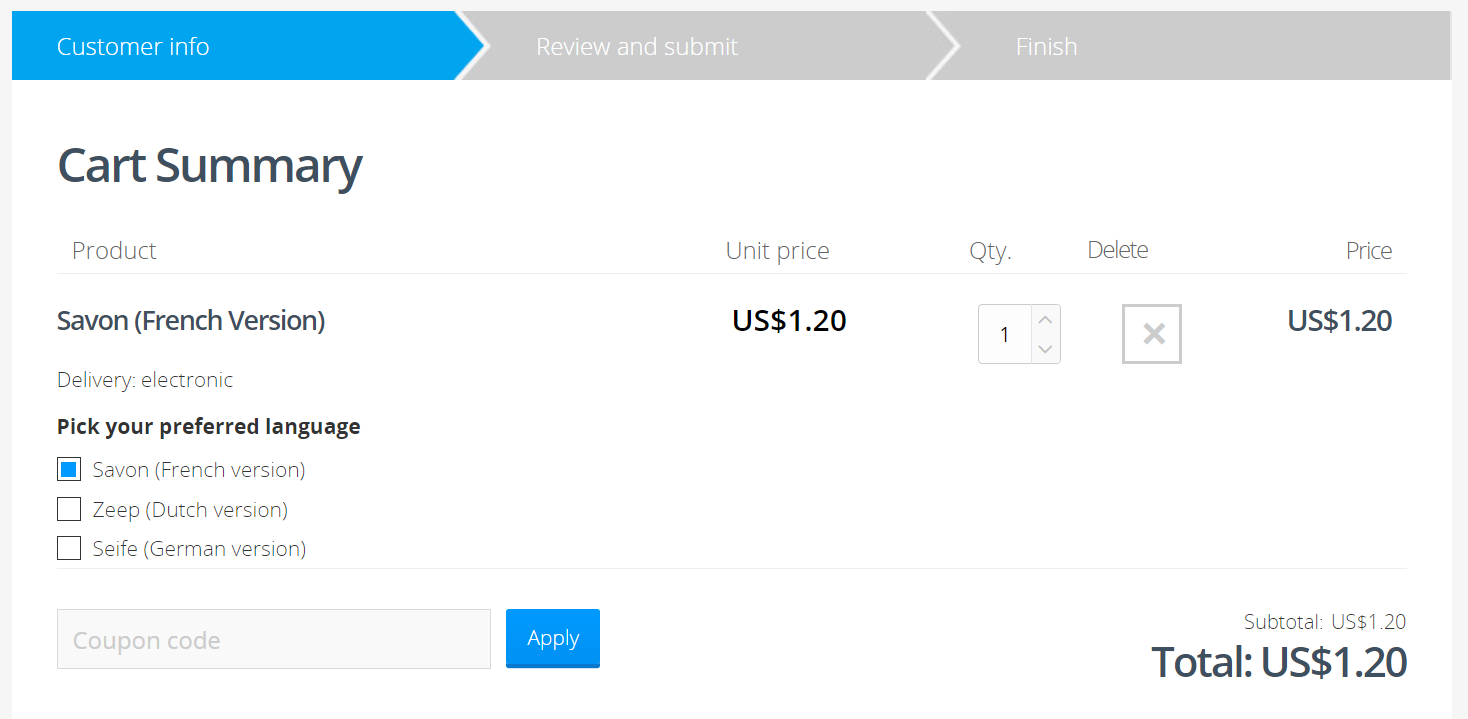
Example - different languages

Selection text is managed in SCM under Configure > Selection Text. For full setup instructions, see Manage selection text.


Did you find this doc useful?